Onigiri: When Japanese Rice Balls Inspire Playful, Human-Centered Typography
Onigiri aren’t just portable meals—they’re cultural shorthand for care, simplicity, and quiet intention. Traditionally hand-formed rice triangles or ovals, often wrapped in nori and filled with umeboshi, salmon, or pickled plum, they carry generations of practical wisdom: nourishing, shelf-stable, deeply personal. Today, that same spirit has quietly migrated into digital design—not as food, but as form. The “Onigiri” font isn’t a novelty gimmick; it’s a thoughtful response to how professionals across disciplines are redefining what “approachable” means in visual communication.
Why Cute Typography Is No Longer Just for Kawaii Blogs
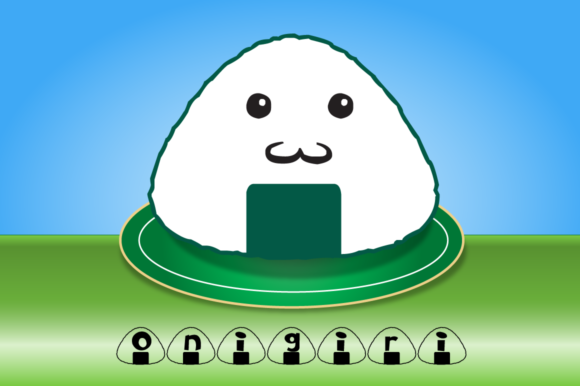
Cuteness—when grounded in authenticity—functions as emotional infrastructure. In a landscape saturated with algorithm-optimized interfaces, sterile corporate templates, and AI-generated uniformity, users increasingly gravitate toward signals of human presence: uneven strokes, gentle curves, subtle asymmetry. Onigiri taps directly into this shift. Its script-based letterforms echo the soft, rounded contours of Japanese mascot characters (yuru-chara), but without caricature. There’s no forced exaggeration—just warmth, tactility, and a lightness of touch that feels intentional, not infantilizing.
This resonates far beyond social media graphics. Educators use Onigiri in classroom handouts to soften cognitive load for neurodiverse learners. Freelance designers apply it to client onboarding emails, where tone impacts trust more than any feature list. Small business owners choose it for packaging labels—not to shout, but to invite closer attention. It’s typography that doesn’t demand attention; it earns it through consistency and charm.
From Mascot Aesthetics to Functional Design Language
The evolution of mascot-inspired design reflects deeper changes in how we work and relate. Early kawaii typography often prioritized whimsy over legibility—think bubble letters or excessive embellishment. Modern iterations like Onigiri succeed by balancing character with clarity. Its lowercase ‘a’ and ‘g’ retain friendly openness, while uppercase letters maintain enough structure to support body text in presentations or printed materials. Even the spacing is calibrated: generous but not airy, encouraging rhythm without sacrificing density.
This balance matters because today’s creators rarely operate in silos. A marketer might draft a campaign brief, design a slide deck, write a newsletter, and record a short video—all in one afternoon. Tools need to adapt to that fluidity. Onigiri supports that workflow: it works equally well in a Keynote headline, an Instagram caption overlay, or a PDF worksheet header. Its dingbat set—onigiri-shaped icons in AI, EPS, and SVG formats—extends that utility further, letting users build cohesive visual systems without switching apps or licensing additional assets.
Practical Use Cases Across Professions
- Bloggers & Content Creators: Swap generic sans-serif headers for Onigiri in tutorial thumbnails or section dividers. The contrast between its soft forms and clean body text (e.g., Inter or Source Sans) creates visual hierarchy that feels intuitive—not engineered.
- Educators & Trainers: Use the onigiri dingbats as low-stakes visual anchors in slide decks—e.g., a riceball icon next to “Key Takeaway” or “Try This.” Research shows simple, consistent icons improve information retention, especially in asynchronous learning.
- Small Business Owners: Apply Onigiri to product tags, thank-you cards, or limited-edition packaging. Unlike high-contrast display fonts, it reads clearly at small sizes and scales gracefully across print and web—no redesign needed when expanding from Etsy to a Shopify store.
- Freelancers & Agencies: Embed it into brand guidelines for clients in wellness, education, or creative services. Its informality signals empathy without sacrificing professionalism—a nuanced positioning many service-based businesses struggle to articulate visually.
Not Just “Cute”—But Contextually Intelligent
What separates Onigiri from trend-chasing fonts is its restraint. It avoids the pitfalls of oversaturation: no glitter effects, no forced bounce, no competing decorative elements. Instead, it leans into the quiet confidence of its inspiration—the way a perfectly formed onigiri needs no garnish to communicate care. That translates to real-world efficiency. Designers report faster iteration cycles because Onigiri “just works” across contexts—it doesn’t require constant kerning tweaks or fallback font stacks.
It also aligns with broader shifts in digital ethics. As users grow wary of manipulative UX patterns—endless scroll, dopamine-driven notifications, aggressive CTAs—there’s rising appreciation for tools that prioritize calm, clarity, and consent. Onigiri doesn’t shout. It suggests. It accompanies. It leaves space—for thought, for breath, for interpretation. That’s not stylistic fluff; it’s functional empathy.
How to Integrate It Without Overcommitting
You don’t need to overhaul your entire toolkit to benefit from Onigiri. Start small and purposeful:
- Replace one recurring element: Try it for email subject lines, newsletter headers, or presentation titles—places where tone sets expectations before a single word is read.
- Pair intentionally: Combine it with a neutral, highly legible sans-serif (like IBM Plex Sans or Open Sans) for body copy. The contrast reinforces hierarchy without visual competition.
- Leverage the dingbats strategically: Use the SVG files in Figma or Illustrator for custom bullet points, progress indicators, or subtle background motifs. Their vector format ensures crisp rendering at any size—no pixelation on retina displays or large-format prints.
- Test readability early: While designed for clarity, always preview at actual usage sizes—especially for mobile interfaces or printed materials under 12pt. Its charm lies in nuance, not compromise.
Importantly, Onigiri isn’t about adopting Japanese aesthetics as decoration. It’s about borrowing a mindset: one that values handmade imperfection, functional elegance, and quiet intention. That mindset is increasingly valuable—not as exotic flair, but as operational resilience. In workflows stretched thin by tool fatigue and attention scarcity, choosing a font that feels both familiar and fresh isn’t indulgence. It’s stewardship of the user’s time and attention.
Looking Ahead—Without the Hype
Typography won’t solve burnout. A playful font won’t replace strategy. But tools like Onigiri reflect something measurable: a growing preference for design that acknowledges the human behind the screen. We see it in the rise of “slow design” principles, in accessibility-first frameworks gaining traction beyond compliance checklists, and in hiring trends that value emotional intelligence alongside technical skill.
Onigiri fits there—not as a trend to chase, but as a considered option among many. Its relevance isn’t tied to viral moments or fleeting platform algorithms. It’s rooted in enduring human preferences: for warmth over cold precision, for coherence over clutter, for intention over inertia. Whether you’re drafting a grant application, designing a workshop syllabus, or building a landing page for a local bakery, that grounding matters.
So consider Onigiri not as “cute text,” but as a quiet collaborator—one that helps your message land with clarity, kindness, and just enough personality to be remembered.