Sunny Script: A Modern Script Font for Purposeful Design
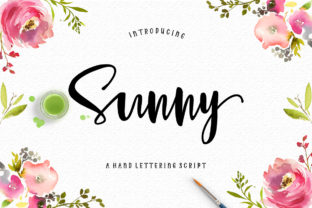
Sunny Script is a contemporary script font distinguished by its intentionally irregular baseline—subtle, organic, and human-scaled. It’s not a calligraphic replica or a rigid monoline revival; it’s designed with rhythm in mind, where each letter carries gentle variation in weight, slant, and vertical alignment. That irregularity isn’t a flaw—it’s functional. It introduces visual warmth and approachability without sacrificing legibility at medium sizes, making Sunny Script especially effective when authenticity and intentionality matter more than uniformity.
Where Sunny Script Fits Into Real Design Workflows
Fonts don’t exist in isolation—they’re activated within workflows. Sunny Script enters most projects not at the start of ideation, but during refinement: when tone has been defined, audience confirmed, and context clarified. For example, a wedding planner finalizing invitation suites will often test fonts after selecting paper stock and color palette—not before. Sunny Script shines here because its feminine yet grounded character bridges elegance and ease. It doesn’t shout; it invites. That makes it a strong candidate during the “tone calibration” phase, where designers align typography with emotional resonance.
Similarly, small business owners building brand assets often cycle between logo concepts, website mockups, and social media templates. Sunny Script works well across those touchpoints when used deliberately—not as a full-body text font, but as a strategic accent. Its irregular baseline adds texture to a clean sans-serif layout, creating contrast that feels intentional rather than decorative. In practice, that means pairing it with fonts like Inter, Poppins, or Lora—not competing with them, but complementing their structure with subtle fluidity.
Practical Implementation Across Common Use Cases
Sunny Script excels where personality meets purpose. Here’s how it integrates smoothly into real tasks:
- Wedding invitations & thank-you cards: Use Sunny Script for names, dates, and short phrases (“Together with love,” “RSVP by June 12”). Avoid long paragraphs—its charm lies in brevity and spacing. Print testing is essential: the irregular baseline reads beautifully on matte cotton paper but can blur slightly on low-DPI digital previews. Always export print-ready PDFs with embedded fonts.
- Greeting cards & quotes: Pair Sunny Script with generous line height (1.4–1.6) and ample letter-spacing (+20–40 units). This prevents visual crowding and lets the baseline variation breathe. On greeting cards, set the main sentiment in Sunny Script and supporting text (e.g., “Wishing you joy”) in a neutral sans-serif—this creates hierarchy without tension.
- Logos & business cards: Limit Sunny Script to one element—typically the business name or tagline. Avoid stacking it with complex icons or gradients. If your logo includes both a symbol and wordmark, place Sunny Script on the right or below the icon, aligned left. This preserves readability while letting its rhythm anchor the composition.
- Digital use (social graphics, email headers): Render Sunny Script as vector or high-res PNG—not live web font—unless using variable font support with fallbacks. Most platforms don’t render irregular baselines consistently across devices. When embedding in Canva or Figma, convert to outlines after finalizing size and spacing to prevent rendering shifts.
Compatibility and Technical Considerations
Sunny Script is available in OpenType format with standard Latin character sets, including ligatures and stylistic alternates. It supports basic diacritics but isn’t built for multilingual publishing—so if your project targets Spanish, French, or Vietnamese audiences, verify glyph coverage early. No extended Cyrillic, Greek, or Arabic support exists, and that’s by design: Sunny Script prioritizes focused utility over broad coverage.
For developers integrating into websites, Sunny Script works best as a display font loaded via @font-face with a robust fallback stack (e.g., font-family: "Sunny Script", "Brush Script MT", cursive;). Never rely on it for body text or navigation labels. Use it only for headings, hero text, or signature elements—and always define minimum font sizes (24px+ on desktop, 20px+ on mobile) to preserve clarity.
In design tools like Adobe Illustrator or Affinity Designer, enable “Align to Pixel Grid” only when exporting for screen. For print, disable it—pixel alignment distorts the natural baseline variation that defines Sunny Script’s character.
Workflow Integration Tips for Consistency and Efficiency
Adopting any new font requires consistency checks—not just aesthetic ones, but operational ones. Before rolling Sunny Script across multiple assets, create a lightweight style guide snippet: define exact font weights (it ships in Regular only), recommended sizing tiers (e.g., 36pt for headlines, 28pt for subheads), and approved pairings. Store this in your team’s shared drive or Notion workspace—not as a formal document, but as a living reference.
For freelancers managing multiple clients, maintain a “Sunny Script usage log”: a simple spreadsheet tracking where and how it was applied (e.g., “Maple & Vine Wedding Suite — Names + Date only, 32pt, letter-spacing +30”). This helps spot overuse or misalignment across projects and surfaces patterns—like noticing it performs better with warm color palettes than cool ones.
When collaborating with printers, send a PDF proof with font outlines *and* a separate JPEG showing how the baseline variation should appear at actual size. Many print vendors optimize files automatically, unintentionally flattening subtle typographic features. A side-by-side visual prevents assumptions.
Long-Term Use and Quality Control
Sunny Script’s strength lies in restraint. Over time, users who apply it broadly—across every heading, button, and banner—tend to dilute its impact. Think of it like a signature ingredient: powerful in the right dish, overwhelming in excess. Audit your usage every 3–4 months. Ask: Does this instance still serve the message? Is the irregular baseline enhancing readability—or distracting from it?
Also consider version control. If Sunny Script receives updates (e.g., expanded language support or kerning refinements), don’t auto-update across all projects. Test revisions in one low-risk asset first—like a single social media graphic—then compare side-by-side with the prior version. Small adjustments to baseline behavior or spacing can shift visual balance more than expected.
Finally, remember that typography is part of a larger system. Sunny Script won’t compensate for weak hierarchy, poor contrast, or unclear messaging. Its value emerges when paired with thoughtful layout, intentional whitespace, and audience-aware content. Use it to reinforce decisions you’ve already made—not to mask uncertainty.
Moving Forward With Intention
Sunny Script isn’t about chasing trends—it’s about selecting a tool that matches how you work and who you serve. Its irregular baseline reflects a broader shift in design: toward authenticity over polish, warmth over perfection, and clarity over ornament. When integrated with preparation, tested in context, and applied with discipline, it becomes more than a font. It becomes a quiet signal—of care, of craft, and of knowing exactly what role type plays in the work you do.