Binaria Family: A Futuristic Sans Serif Built for Impact—Not Just Looks
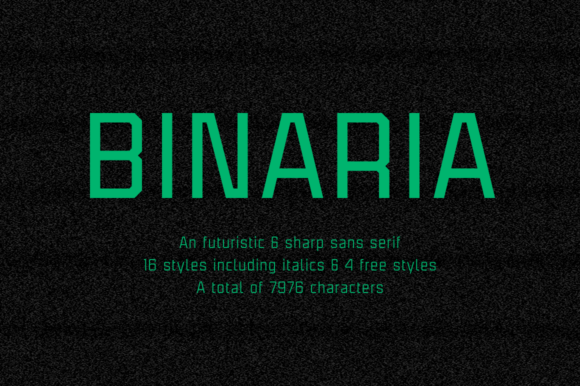
When you need a typeface that commands attention without shouting, the Binaria Family stands out—not because it’s flashy, but because it’s intentionally grounded in clarity, structure, and quiet confidence. Designed in 2018 by Pablo Balcells for Graviton Font Foundry, Binaria is a sans serif with a distinct mechanical character: squared terminals, angular joints, and tightly tuned proportions. It doesn’t try to mimic handwriting or evoke nostalgia. Instead, it leans into geometry—clean, deliberate, and unapologetically modern.
That makes it especially effective for logos, headlines, exhibition signage, app interfaces, and short-form editorial layouts. But here’s where many people misstep: they assume Binaria works equally well across *all* contexts—especially long paragraphs or body text—simply because it looks sharp at first glance.
Assuming Binaria Is “Just Another Sans Serif”
Binaria isn’t neutral like Helvetica or versatile like Inter. Its strength lies in its assertiveness—not its adaptability. Its angular shapes and uniform stroke contrast create excellent visual rhythm in large sizes, but those same features can fatigue readers in extended reading. Small caps are included in all 12 styles (6 weights × 2 widths), and language support spans Western, Central, and Eastern European Latin-based scripts—but that doesn’t mean it handles dense multilingual body copy gracefully.
One designer recently used Binaria Light Italic for a 3,000-word blog post. The result? Low readability scores, higher bounce rates, and reader comments like “felt like reading code.” The font wasn’t wrong—it was just mismatched. Binaria excels when used *intentionally*, not exhaustively.
Overlooking Weight and Width Nuances
The Binaria Family includes 12 distinct styles—not just six weights with matching italics. It also offers Condensed and Extended variants for each weight. That means Binaria Bold Condensed and Binaria Bold Extended aren’t just optical tweaks; they’re structurally adjusted to maintain legibility and impact at different spatial constraints.
A common oversight is treating Condensed as merely “narrower Helvetica.” In Binaria, Condensed versions reduce horizontal space *without compressing letterforms unnaturally*. The counters stay open, spacing remains even, and rhythm holds. But if you apply automatic tracking reduction or force-fit Condensed into tight UI buttons without testing at actual size, you’ll lose that benefit—and risk clipped characters or uneven visual weight.
Tip: Always preview your chosen style at its intended usage size—on the actual device or medium. A Binaria Bold Extended headline on a billboard reads powerfully at 5m distance; the same style at 14px in a mobile menu may feel clunky and imbalanced.
Misjudging Licensing and Technical Fit
Binaria is sold as a desktop + web license bundle from Graviton—but not all sellers offer full access. Some third-party marketplaces list only subsets (e.g., Regular + Bold) or omit OpenType features like small caps, stylistic alternates, or language-specific glyphs. If your project targets Spanish, Polish, or Turkish audiences, missing diacritic coverage or localized kerning pairs will show up as awkward spacing or rendering errors—especially in static PDFs or embedded SVGs.
Also, while Binaria supports variable-axis interpolation in design tools like Figma and Adobe apps, the official release is *not* a variable font. Don’t expect continuous weight or width sliders unless you’re using a custom-compiled version (which isn’t officially supported). Assuming otherwise leads to wasted time troubleshooting non-existent axes.
Skipping Real-World Testing Before Committing
It’s tempting to judge Binaria solely by its specimen page—clean, crisp, perfectly spaced. But real-world use introduces variables: screen resolution, rendering engines (Windows ClearType vs. macOS Quartz), background contrast, print paper stock, and even ambient lighting.
Example: A branding agency selected Binaria Medium for client email headers, assuming its clarity would translate across Outlook, Gmail, and Apple Mail. In practice, Windows Outlook rendered it slightly bolder and less defined due to legacy rasterization—making subheadlines appear heavier than intended. Their fix? Switching to Binaria SemiBold *only* for email-safe fallback stacks, and pairing it with a webfont-loaded version for clients who view in modern browsers.
Before finalizing, test Binaria in your actual delivery environment—not just in mockups. Load it on an older Android device. Print a sample on uncoated paper. Check contrast ratios against WCAG guidelines (especially for light-on-dark uses). These checks take 10 minutes and prevent rework later.
Underestimating Pairing Potential
Because Binaria feels so self-assured, some designers avoid pairing it altogether—defaulting to “Binaria everywhere.” That’s a missed opportunity. Its mechanical tone pairs exceptionally well with humanist serifs (like Lora or Merriweather) for editorial depth, or with geometric monospaced fonts (like IBM Plex Mono) for tech-forward contrast.
What *doesn’t* work well? Overly decorative or high-contrast fonts. Slab serifs with heavy stress or exaggerated brackets clash with Binaria’s precision. Likewise, overly rounded sans serifs (like Nunito or Quicksand) dilute its structural intent.
Better approach: Use Binaria for primary hierarchy (logo, H1, call-to-action buttons), then choose a secondary typeface with clear x-height alignment and compatible cap-height proportions. Preview both together in real layout—not side-by-side specimens.
Final Checks Before You Choose or Use Binaria
- Match the use case: Is this for a logo, banner, or interface element? Or are you planning to set paragraphs, captions, or data tables?
- Verify the source: Purchase directly from Graviton Font Foundry or authorized resellers to ensure full glyph sets, updates, and licensing clarity.
- Test language coverage: If supporting accented characters or extended Latin scripts, download and inspect the character map—not just the preview image.
- Check rendering consistency: View your selected weight/width at 16px, 24px, and 48px on multiple devices before embedding.
- Respect its role: Let Binaria lead—but don’t ask it to carry every typographic responsibility in your system.
Binaria Family isn’t about fitting in. It’s about standing apart—with purpose, precision, and presence. When used with awareness—not assumption—it becomes more than a font. It becomes part of your message’s architecture.