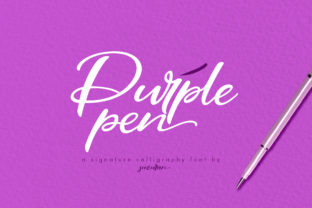
Purple Pen: A Script Font That Fits Real Creative Workflows
When you’re designing a wedding invitation, refining a brand logo, or laying out a boutique poster, typography isn’t just decoration—it’s part of your decision-making process. Purple Pen is a fresh, hand-drawn script font that bridges intention and execution. It’s not just “pretty.” It’s purpose-built for moments where personality, polish, and practicality converge—whether you're a freelance designer finalizing client assets, an educator crafting classroom materials, or a small business owner preparing a seasonal campaign.
Where Purple Pen Fits in Your Creative Process
Fonts rarely exist in isolation. They enter workflows at specific inflection points—often after strategy, during visual development, and before final delivery. Purple Pen shines most when the goal is to signal warmth, individuality, or refined playfulness without sacrificing legibility or professionalism. Unlike overly ornate scripts that demand excessive kerning or spacing adjustments, Purple Pen balances flow with structure. Its letterforms have consistent rhythm, natural entry/exit strokes, and subtle contrast—making it usable across sizes and formats without heavy manual tweaking.
Think about how it integrates: You might sketch a logo concept on paper, then switch to Illustrator or Figma to refine it. At that stage, swapping in Purple Pen gives immediate feedback on tone and hierarchy. It helps answer real questions: Does this headline feel inviting but still trustworthy? Does the script complement—not compete with—the supporting sans-serif body text? That kind of rapid iteration is where Purple Pen adds measurable time savings.
Practical Use Cases Across Roles and Tools
Different users bring different needs—but all benefit from consistency, compatibility, and control. Here’s how Purple Pen adapts:
- Freelancers & designers: Use it as a primary display font in branding kits. Pair it with a clean geometric sans (like Inter or Montserrat) for balance. Export vector outlines if needed for client handoff—no licensing surprises.
- Small business owners: Drop it into Canva templates for social banners or email headers. Its OpenType features include standard ligatures and alternate characters, so even basic editors can access subtle refinements without advanced software.
- Educators & bloggers: Apply it selectively—to section dividers in digital course modules or title slides in presentations. Because it’s highly readable at 24–36pt, it avoids the fatigue of overly decorative fonts in long-form layouts.
- Wedding planners & stationers: Combine it with high-resolution textures (linen, watercolor) in Photoshop or Affinity Designer. The slight irregularity in stroke weight mimics real ink, helping digital invites feel tactile and intentional.
It works reliably in desktop apps (Adobe Creative Cloud, Affinity Suite), web environments (via @font-face or variable font hosting), and even some modern CMS platforms that support custom font uploads—provided the license permits it. Always verify usage rights before embedding in client-facing websites or SaaS dashboards.
Preparing to Use Purple Pen Effectively
Adopting any new font requires more than installation. It’s about alignment—between the tool and your existing standards. Before using Purple Pen across projects, consider these practical prep steps:
- Define your use boundaries: Reserve it for headlines, quotes, or accent elements—not body copy or data tables. This preserves clarity and reinforces visual hierarchy.
- Test contrast and size early: On screens, start at 28pt minimum for headings; in print, test at 14pt for fine details like envelope addressing. Its elegance holds up, but only when given enough space.
- Standardize pairings: Create a quick style guide snippet listing go-to companion fonts and color palettes. For example: Purple Pen + Roboto (Google Fonts) + #4A3F7C (deep violet) = cohesive, accessible, on-brand.
- Organize files systematically: Keep the .otf/.ttf files in a labeled “Display Fonts” folder alongside license documentation. Name variants clearly (e.g., “PurplePen-Regular”, “PurplePen-Alternate”). This prevents version confusion across team members or over time.
One overlooked factor is output consistency. If you’re exporting PDFs for print, embed the font—or convert to outlines if sharing externally. In web projects, serve woff2 versions with fallbacks. These aren’t just technical checkboxes; they’re quality-control steps that prevent last-minute formatting breaks.
The Night in Kansas Bonus Font: Strategic Complement, Not Afterthought
Included with Purple Pen is Night in Kansas—a complementary serif with gentle slab influence and quiet confidence. It’s not a “matchy-matchy” pairing. Instead, it offers grounded contrast: where Purple Pen leans expressive, Night in Kansas provides stability. Use it for subheadings, captions, or body text in invitations and editorial layouts.
This duo reflects thoughtful design workflow logic: one font handles voice and emotion; the other handles information and structure. Together, they reduce the need to juggle three or four typefaces just to achieve balance. For educators building slide decks or marketers drafting newsletter copy, that simplicity translates directly into faster decisions and fewer revision rounds.
Maintaining Quality and Long-Term Usability
A font’s longevity depends less on trendiness and more on adaptability. Purple Pen holds up because it avoids extremes—it’s neither too formal nor too casual, neither rigid nor chaotic. That makes it easier to reuse across projects without feeling repetitive. A logo designed with Purple Pen in 2023 still reads as current in 2025, especially when supported by strong layout and color choices.
To sustain its effectiveness over time:
- Limit stylistic variations—stick to one weight unless you’ve tested bold alternatives for accessibility (e.g., screen reader compatibility and WCAG contrast ratios).
- Revisit usage guidelines every 6–12 months. As your brand evolves or your tools update, reassess whether Purple Pen still fulfills its original role—or whether it’s time to layer in a new accent font while keeping Purple Pen for legacy continuity.
- Archive project files with embedded font metadata. If you ever need to reopen a 2022 Canva template or Figma file, having clear attribution helps avoid substitution errors.
Consistency doesn’t mean rigidity. It means knowing why you chose Purple Pen—and being able to explain that choice to a client, teammate, or future version of yourself.
Integrating Smoothly Into Your Routine
You don’t need to overhaul your workflow to use Purple Pen well. Start small: pick one recurring asset—say, Instagram story templates or workshop handouts—and apply it there for two months. Observe how it affects readability, engagement, and your own speed in production. Then expand outward only if the results justify it.
What matters isn’t how many projects use Purple Pen—but whether each use advances a clear objective: strengthening brand recognition, improving audience connection, or simplifying a step in your process. When it does, it earns its place—not as a novelty, but as a reliable part of your creative infrastructure.