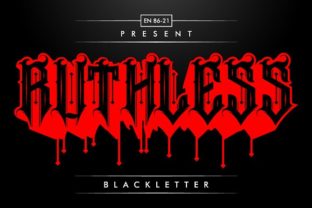
Rhino: A Blackletter Font That Anchors Design With Strength and Refinement
Rhino is not just another blackletter font—it’s a deliberate design choice for professionals who need typographic authority without sacrificing elegance. Its sharp serifs, balanced weight distribution, and confident letterforms make it stand out in contexts where visual impact matters: branding systems, editorial headlines, packaging, presentation decks, and identity guidelines. Unlike many blackletter fonts that lean heavily into historical ornamentation or digital distortion, Rhino strikes a practical middle ground—structured enough for clarity, expressive enough for distinction.
Where Rhino Fits in Your Design Workflow
Think of Rhino as a strategic asset—not something you drop in at the last minute, but a decision made early in the design process to shape tone, hierarchy, and perception. It works best when selected during the concept phase, alongside color palette and layout direction. That timing ensures consistency across deliverables: if Rhino anchors your logo lockup, it should also guide headline treatment in social banners, email headers, and printed collateral. Skipping this alignment often leads to visual fragmentation—where the brand feels authoritative in one place and generic in another.
For marketers building campaign assets, Rhino serves as a tonal anchor. A bold “Rhino” headline paired with clean sans-serif body text (like Inter or Helvetica Neue) creates contrast that guides attention without overwhelming. For educators designing workshop handouts or course modules, Rhino adds gravitas to section titles while remaining legible at 24–36 pt sizes—especially when exported as vector or high-DPI raster assets.
Practical Integration Across Tools and Platforms
Rhino is delivered in standard OpenType (.otf) format, making it compatible with Adobe Creative Cloud apps (Photoshop, Illustrator, InDesign), Figma (via desktop app or web plugin), Affinity Suite, and modern web environments using @font-face. No special installers or licensing hurdles—just drag, install, and assign. That simplicity matters when you’re juggling multiple projects across clients or departments.
In Figma, Rhino pairs well with auto-layout components: define a heading style using Rhino at 48 pt weight 700, then reuse it across frames with consistent spacing and responsive scaling. In InDesign, use paragraph and character styles to lock Rhino’s tracking and baseline shift—critical for avoiding uneven rhythm in tight headlines. When exporting for web, convert Rhino to WOFF2 and serve it via CSS with fallbacks (font-family: "Rhino", "Georgia", serif) to maintain hierarchy even if loading fails.
For small business owners updating their Shopify or Squarespace site, Rhino works cleanly in custom CSS fields—but avoid applying it to full-body paragraphs. Reserve it for H1s, logos, and hero banners. Use browser dev tools to test rendering across Chrome, Safari, and Firefox; Rhino’s hinting holds up well on macOS and Windows, though iOS may require slight line-height adjustments for optimal readability.
Using Rhino Before, During, and After a Project
Before: Assess whether Rhino matches your project’s intent. Ask: Does this need tradition with edge? Is the audience receptive to strong typographic personality? If you’re designing a luxury skincare line or a boutique law firm’s rebrand, Rhino signals craftsmanship and permanence. If you’re building a playful kids’ app interface, it likely doesn’t belong—even if it looks “cool.” Use Rhino intentionally, not decoratively.
During: Maintain fidelity by limiting its use to two weights—regular and bold—and no more than three sizes per context. Overusing variants dilutes impact and complicates file management. In collaborative environments, document Rhino usage in your brand guideline PDF or Notion page: specify minimum size (20 pt for print, 32 px for web), acceptable color contrast ratios (4.5:1 against background), and prohibited pairings (e.g., avoid other blackletter or script fonts nearby).
After: Audit Rhino’s application before final delivery. Check PDF exports for font embedding (InDesign: “Embed all fonts” enabled), verify web font loading speed (aim for under 40 KB compressed), and confirm accessibility compliance—screen readers handle Rhino fine as long as it’s applied to semantic HTML headings ( Rhino was designed for Latin-based languages and handles English, Spanish, French, German, and Portuguese characters reliably—including accented glyphs and ligatures (ff, fi, fl). It does not support Cyrillic, Arabic, or East Asian scripts. If your project targets multilingual audiences, plan typography hierarchies accordingly: Rhino for English headers, paired with a robust global font (like Noto Sans or IBM Plex) for body copy and translated sections. Print production requires extra care. At small sizes (<12 pt), Rhino’s fine details risk filling in on uncoated paper or low-resolution presses. Stick to 14 pt minimum for captions, and always request a physical proof before bulk runs. For laser engraving or foil stamping, convert Rhino text to outlines in Illustrator and confirm stroke width meets vendor specs—typically ≥0.25 pt to avoid breakage. Adopt Rhino with an eye toward scalability. A font that works for your current website should also serve your next annual report, investor pitch deck, or trade show banner—without visual whiplash. Build reusable templates: a Rhino-based slide master in PowerPoint, a Canva brand kit preset, or a Figma design system token for Track usage over time. Note where Rhino performs best (e.g., “Rhino + dark navy background yields strongest engagement in email subject lines”) and where it underperforms (e.g., “Rhino in light gray on white fails WCAG AA”). These observations feed smarter refinements—not just for Rhino, but for how you evaluate any typeface moving forward. Rhino doesn’t replace planning—it supports it. It won’t fix weak messaging, but it will amplify strong ideas with unmistakable presence. When used with intention, Rhino becomes part of your workflow’s infrastructure: reliable, recognizable, and quietly powerful. Whether you’re refining a logo, preparing a client presentation, or launching a product page, let Rhino do what it does best—anchor meaning with strength and elegance, without demanding attention for its own sake., ), not styled Compatibility and Real-World Constraints
Long-Term Usability and Consistency
type-heading-primary. This reduces decision fatigue and ensures every new asset inherits the same typographic voice.Workflow Tips You Can Apply Today
🔗 You Might Also Like